Stateful responsibility
A short view back to the past - when work on the Elixeum portal began, every Vue component used to handle its own requests by itself, that usually meant that every list component had locally implemented API call to count, to list with paging options and at least to delete request for specific element of said list. And every detail component had all of the CRUD API calls integrated into it as well.
This quickly proved to be unsustainable as large chunks of code were being copy/pasted across many components, sometimes even without changing a single bit of code - and that’s without even mentioning that we had to pass all the data across components using props so that we can at least partially minimize amount of load being applied on the server.
And it got even worse when first change request from business side came through - now we had to go through all this and update it everywhere.
We obviously needed something better, something more robust, something that’s less PITA and more enjoyable to work with.
And this blogpost is exactly about that - our journey from locally handled API’s to completely stateful workflow when it comes to API and Frontend communication.
States provide a new hope
Vue obviously provides solutions for all of the above mentioned problems, no matter if you choose to use Pinia, Vuex, or any other state management library, you will get rid of many headaches due to clear separation of responsibilities.
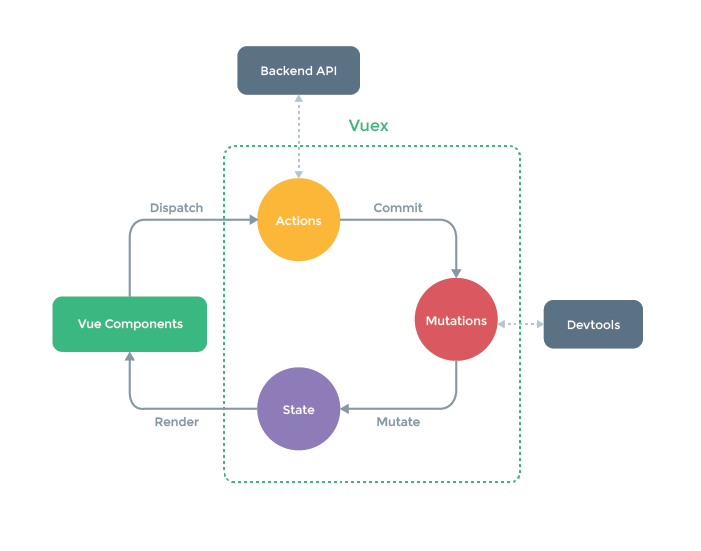
As seen in the diagram above, there is clear order and definition of which part of your codebase is responsible for managing API connection, which one stores the data, which one provides it to the UI and how the UI communicates back to the backend.
Not to mention that this also allows you to remove all the duplicated code from before, store it in one place and just use it when needed in any UI component. Great start!
Copy/paste strikes back
But then again, all of your state files will usually have the same structure:
- They will likely import some kind of constants file with API endpoints
- They will likely handle your general data management problems such as paging or filtering
- They will likely perform all CRUD operations in addition to listing and counting
Oh and by the way, having separate endpoints for counts is so 2010, just add them to header of your listing endpoints as X-Total-Count and feel the extra coolness points that come with it 😎
And then in some cases, they will perhaps perform something more specific, but most of the time it’s at the very least super similar, just over different endpoints and different datasets. And the lure of the “copy/paste” dark side of many developers starts to get strong again…

What would a Jedi do? Well, apart from destroying the Death Star again… they would try to figure out how to create a template - or something in that vibe. For states that share a lot of the same logic, it seems pretty obvious, don’t it?
So here’s our thought process - some of our shared codebases come from modularized npm packages, let’s put it in there and implement the package across the whole codebase, that’s going to be great! Even if it comes at the cost of slowly migrating most of the already existing state logic to this templated code.
At the end of day, every UI module registers it’s own state files, they can be named anything the developer might find fitting, so why not go this route?
All you have to do is to pass the templated code metadata that identifies endpoints to call, how the state should be registered and named - and if there is anything extra, what’s to stop you from just using Javascript’s beautiful spread operator to extend an existing state (it’s just an object) with your custom logic? That’s right - nothing.
State factory giveth and state factory taketh away
And so we created a factory for states that constructs entire state handling - for basic lists and CRUD you literally only have to pass it API paths to call, as well as parameters it should inject into the URL from provided payloads.
This provides us with major savings when it comes to amount of code we have to write whenever we create new state - for the most basic states we went from approximately 150 lines to 30, for the more complex ones with custom logic and extra endpoints we went from approximately 350 to 200 - not as huge, but still a saving. And quite frankly - most states really only handle basic list + CRUD functionality, the savings are actually pretty major through the macro lens.
Saving time pleases management, saving lines of code and headaches pleases developers - everybody is happy then, yes? Most of the time, yeah.
Issues with generic approach eventually bite you back when you need to perform something very custom and in these cases we found out that it’s just easier to let you extend and/or override the generated state logic, rather than trying to figure out a parameter name and where to put one more if branch. And as we talked about it in the previous part, Javascript lets you do just that - so we decided to embrace it! Mostly because we just couldn’t come up with more parameter names though… for sure. 🤓
Return of the responsibility
It seems like everything about states is already figured out, it’s working, it’s kind of magical and it’s saving us headaches… well, sometimes. It’s not completely related to state management as much as it is related to how you actually work with data across Vue components…
You see, for some time it seemed like a great idea to just have every component bind to a specific state and to some extent abandon the way of passing data through props altogether. That works great - if all your components are single purpose and specifically tailored for the use case they had prescribed in their initial UserStory ticket.
But all it takes is one change request, or one user story - that contains the magical word repurpose, or reuse, or use existing… you get the idea.
You seemingly have 90% of your work already done on UI side, all it takes is an if here and if there - and bam, in 2 hours you’re done… until that component requires you to use a different endpoint with some difference in data structure - and it breaks apart completely.

And then when you finally test out changes in the target UI component, it works amazingly well, so you’re satisfied with the result, open a PR and set the task to Done…
Until next day your favorite QA engineer is setting Slack on fire while informing everybody that something completely different broke. Sometimes it’s more obvious, sometimes it requires investigation who might get the blame - still though, these changes you wrote and committed bite you back.
Why is that? Well, if the state handles a lot of extra logic that is specific to a certain UI component, you must not approach it as something universal. Seems obvious, but sometimes them most obvious things are the easiest to miss.
If you’re dispatching actions to other states than the one dispatching them, it’s most likely that creating a separate file that will perform this is better approach.
Good indicator for when to put logic into component specific state is when you have multiple states that depend on each other. Let’s say we have a more complex UI component that contains many other components with different data sources. Updating one source requires you to also update other one, and then maybe another one in different case.
Handling this inside your component directly isn’t really feasible if you need to trigger different behaviors in different situations, unless you want to go crazy with $refs and bloat your “parent” component with data handling logic.
The other way might be some form of god-state that handles all of these things in one, but then again some of these child components might be used elsewhere, and that includes their states. Remember, we are trying to minimize amount of copy pasting.
So that lead us to creating component specific states that handle the core logic and dispatch required actions to its own child states - which are different instances than the generic ones, so you have no overlap with the same component that is used elsewhere - and you get the readability of almost state-machine-like behavior in some situations. And when a component needs to decide which states to dispatch actions to, you can always tell it through Vue props. Lovely.
Takeaways
There is no universal truth, but the core principles remain the same across teams and people, some of it may seem obvious, but it’s still easy to miss in real life scenarios:
- Do the absolute maximum to prevent copy-pasting of code
- When you copy-paste code too much, instead figure out way to go around it, e.g. using factories
- Write code with clear responsibility separation
- Write states with clear responsibility separation (this isn’t the same as point above)
- Never start implementing specific scenarios into places that are obviously meant to be global and generic
- Don’t go crazy when implementing change requests, prevent craziness from the start by separating overlapping complex states
Copy leads to paste. Paste leads to hate. Hate leads to suffering.
Oh and you should never settle on something as your definitive solution, always iterate, always look for ways to improve the code - refactoring is not a bad word. We already have a lot of plans to further improve on stats with things such as memory management, garbage collection of old data and more.
So - to be continued, perhaps.